Section 9: Prompt Engineering and Generating Image Detection Code [Hands-on]
FlexServ API Prompt: YOLO Evaluation Script Generator
Task Summary:
To test the capabilities of the FlexServ inference server, we can provide a complex prompt to the Responses API. This prompt asks the AI to generate a complete Python evaluation script that performs Animal detection on the images from the LILA BC Small Animal dataset. This is a large camera-trap image dataset used for wildlife monitoring and ecological research. It contains millions of images captured by automated cameras, including small mammals and many blank triggers, along with annotations describing the detected species. For training object detection models such as YOLO, the dataset can be downloaded in YOLO format, where each image has a corresponding .txt label file containing bounding-box coordinates in the form
Exploring the FlexServ UI
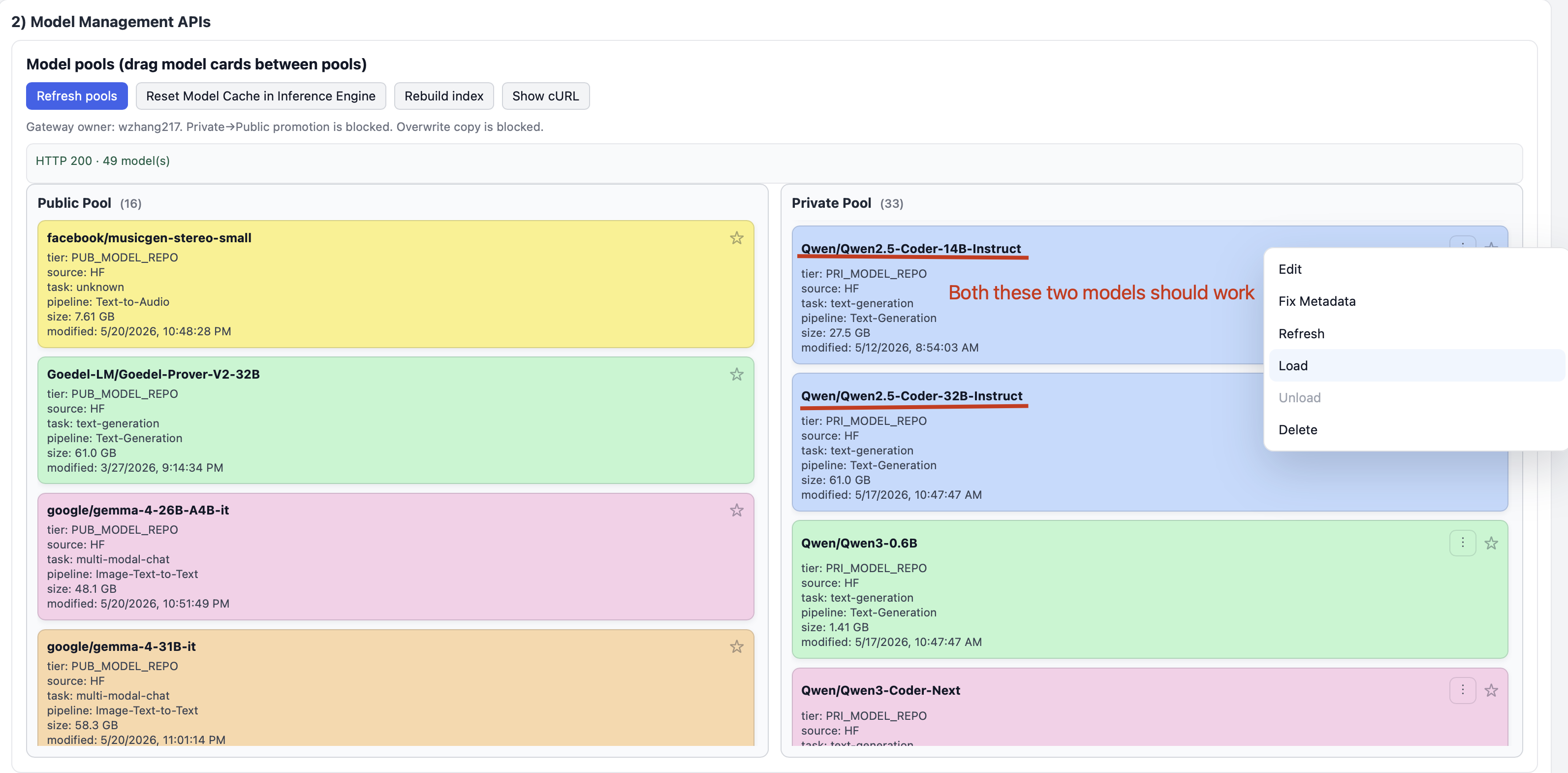
Refresh Model Pool
- Refresh the Model pool so you can see public and private models available for you to run.
- Drag the following model from public pool to private pool.
- Qwen/Qwen2.5-Coder-14B-Instruct
- Qwen/Qwen2.5-Coder-32B-Instruct
- Right click one of the above models and click Load in the menu.
- Wait until the progress bar completes. If load fails, try again.
Update the Responses API and Parameters
- Below is the prompt for our code generation. Before pasting it into the chat box of FlexServ, make sure you update the following FACTS in the
FACTS TO KNOWsection:- BASEURL of FLEXSERV inference engine: (your FlexServ URL here)
- Bearer Auth token for FLEXSERV inference engine: (your FlexServ Token here)
## Prompt:

TASK DESCRIPTION:
  * This is an IMAGE-LEVEL BINARY CLASSIFICATION task implemented using an object detection model.
  * The goal is to determine whether an image contains an animal or not.

DATASET STRUCTURE:
  * DATASET_ROOT contains three subdirectories: train, test, and val.
  * Each directory contains two subdirectories:
  * images/ → contains image files (.jpg, .jpeg, .png)
  * labels/ → contains YOLO format .txt files

GROUND-TRUTH LOGIC:
  * An image is considered an animal if a corresponding .txt file exists and is not empty in the labels/ folder.
  * A non-empty file is a file whose size is larger than 0, and the size of an empty image is 0.

MODEL REQUIREMENTS:
  * Use ONLY a pretrained Ultralytics YOLO detection model (e.g., yolov8n.pt).
  * Call our RESTful API for yolo inference.
  * Assume YOLO detects animals using class ID animal at index 0.

YOLO INFERENCE APIs:

  * Sample CURL Request:
    ```
    curl -sS -X POST '${BASEURL}/v1/yolo/infer' \
    -H 'Authorization: Bearer ${FLEXSERV_TOKEN}' \
    -H 'Content-Type: application/json' \
    -d '{"model":"${FLEXSERV_MODEL_ID}","task":"detect","source":{"type":"upload","media_type":"image","content_base64":"data:image/jpeg;base64,/9j/4AAQSkZJRgABAQAAAQABAAD/2wBDAAgGBgcGBQgHBwcJCQgKDBQNDAsLDBkSEw8UHRofHh0aHBwgJC4nICIsIxwcKDcpLDAxNDQ0Hyc5PTgyPC4zNDL","filename":"NOR3__2019-07-19__11-40-00-1-_JPG.rf.b85ee30f99a803b09f8c5a7da7f9a508.jpg"},"params":{"conf":0.25,"iou":0.7,"imgsz":640,"max_det":300,"show_labels":true,"show_conf":true},"response":{"include":["predictions","timing"],"box_format":"xyxy","classification_topk":5,"return_original_shape":true}}'
    ```

  * RESPONSE:
    ```
    {
    "object": "yolo.inference",
    "task": "detect",
    "model": "/app/models/private/yolo--yolo26l/model.pt",
    "media_type": "image",
    "predictions": [
        {
        "frame_index": 0,
        "path": "image0.jpg",
        "original_shape": {
            "height": 640,
            "width": 640
        },
        "detections": [
            {
            "class_id": 61,
            "class_name": "toilet",
            "confidence": 0.480474591255188,
            "bbox": [
                0,
                29.76239013671875,
                637.2445068359375,
                629.2056274414062
            ],
            "bbox_format": "xyxy",
            "track_id": null
            }
        ]
        }
    ],
    "timing": {
        "inference_ms": 21.03
    },
    "annotated_media": null,
    "annotated_media_mime_type": null,
    "annotated_media_filename": null,
    "warnings": []
    }
    ```
For each image, one object in the 'predictions' array, any if anything detected, the 'detections' array will contain
a list of detected objects, and if nothing detected, there won't be 'detections' array.
If any detected object is with class_id=0, an animal is detected.


DETECTION LOGIC (IMPORTANT):

  * Run object detection on each image.
  * If the model produces AT LEAST ONE detection of an animal class with confidence >= 0.5 and IoU >= 0.7:
  *   → The image-level prediction is animal.

EVALUATION METRICS:

  * Iterate through the images in the test split.
  * Compare the image-level prediction with the ground truth (existence of label file).
  * Count: True Positives, True Negatives, False Positives, and False Negatives.

ACCURACY DEFINITION:

  * Overall accuracy = (True Positives + True Negatives) / Total Images

OUTPUT REQUIREMENTS:

  * Print for each image: filename, ground-truth status, and prediction.
  * At the end, print a summary report including total images, counts for each metric, and overall detection accuracy.

CODING REQUIREMENTS:

  * Store the main path in a global varaible DATASET_ROOT.
  * Set global variable for BASEURL and Bearer Auth Token (i.e. FLEXSERV_TOKEN).
  * Set global variable for BASE_YOLO_MODEL and FINE_TUNED_YOLO_MODEL, and also a MODEL_TO_USE for easy model switching.
  * Set global variable for confidence threashold and IoU threashold.
  * Make sure we disable SSL/TLS verification and also disable the related warning.
  * Make sure we pass image_name into the yolo inference request.
  * Make sure we pass the correct header for auth token and content-type in the final request.
  * Make sure we pass the request body correctly in the final request.
  * The `content_base64` field in the request should start with "data:image/jpeg;base64," and then appended with the base64 encoded image data.
  * Use pathlib or os for robust file path matching.
  * Read only .jpg files.
  * For inference of each image file, print the number of the image versus total number of images, the time spent for each inference request versus the total time spent for the entire inference step (in ms), the ground truth and detection result.
  * Include clear comments explaining each step.
  * Output the accuracy in percentage format.
  * Don't use any mock or dummy functions. Make sure every line functions.
  * It is okay to capture general Exception instead of every single type of Exceptions.

DEFENSIVE PROGRAMMING
  In case of any unexpected conditions, make sure the following:
      1. Make sure we don't do SSL/TLS verification when sending request.
      2. Make sure we avoid zero division

FACTS TO KNOW:
  * BASEURL of FLEXSERV inference engine: https://vista.tacc.utexas.edu:60324
  * Bearer Auth token for FLEXSERV inference engine: 31b8148f20a4e8749dc232b48158a64b93ac7a988bd6aba5cc5de90c5654f984
  * FLEXSERV model ID format: FLEX:{PUB|PRI}:author/model[@revision], we only use private model pool, and omit the revision in model ID.
  * DATASET_ROOT address: /home/jovyan/ai-tutorial-2026/datasets/AnimalEcology.v4i.yolov11
  * BASE_YOLO_MODEL for the request:  FLEX:PRI:yolo/yolo26n
  * FINE_TUNED_YOLO_MODEL for the request:  FLEX:PRI:yolo/yolo26n-fine-tuned

After the code, briefly explain how the program works in plain English.
Once you finished modifying the prompt, copy and paste the prompt into the chat box of FlexServ responses API test page.
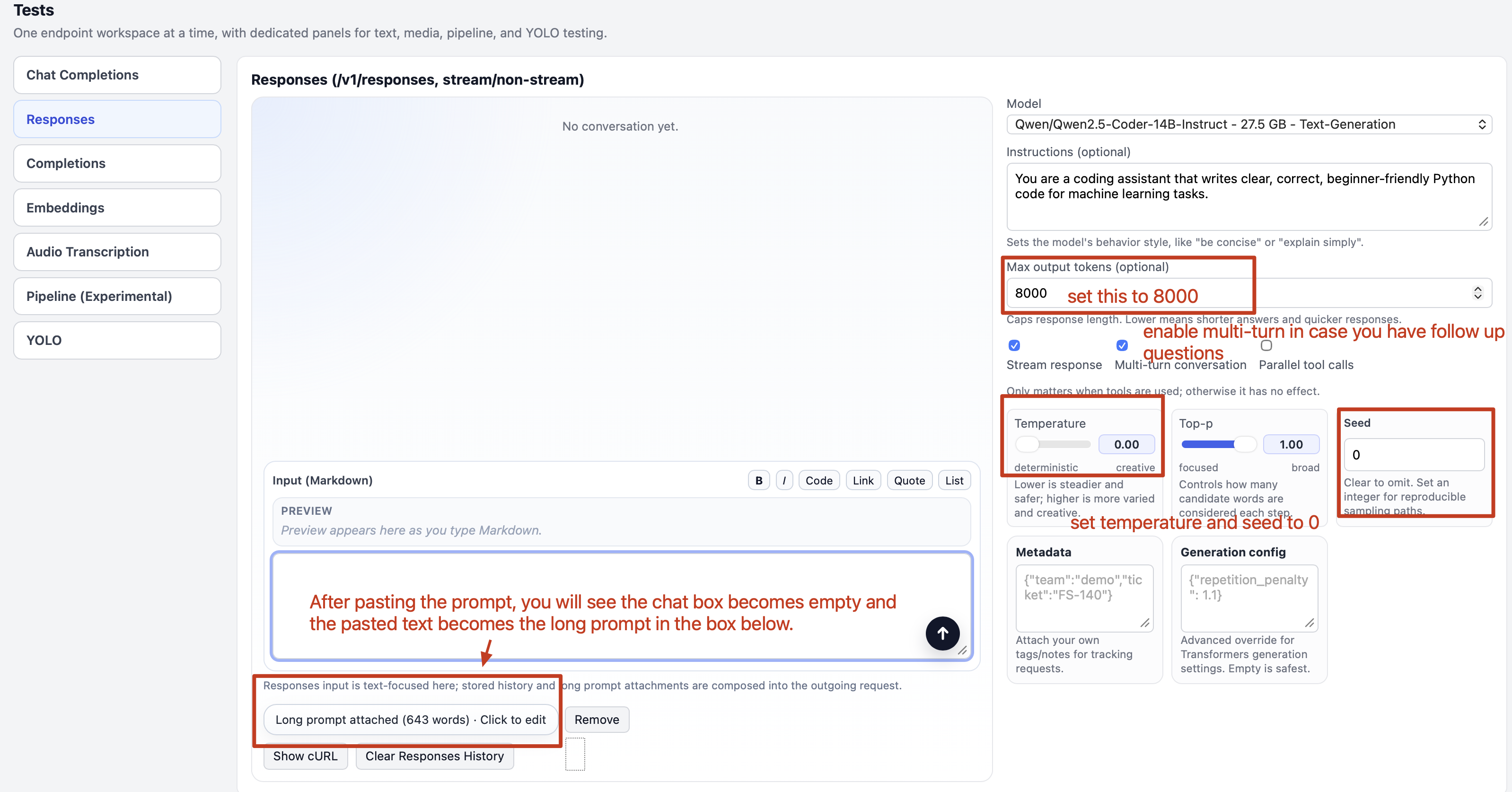
- Select the loaded model from the model dropdown list.
- The prompt is very long, so you might see it becomes a long prompt button below the chat box, which is normal
- Change the
temperatureandseedto 0 for a deterministic solution. - Make sure the
Streamsis checked. - Check
Multi-turn conversation. If you need to clear the conversation history, click the Clear Responses History button. - Press the send button.
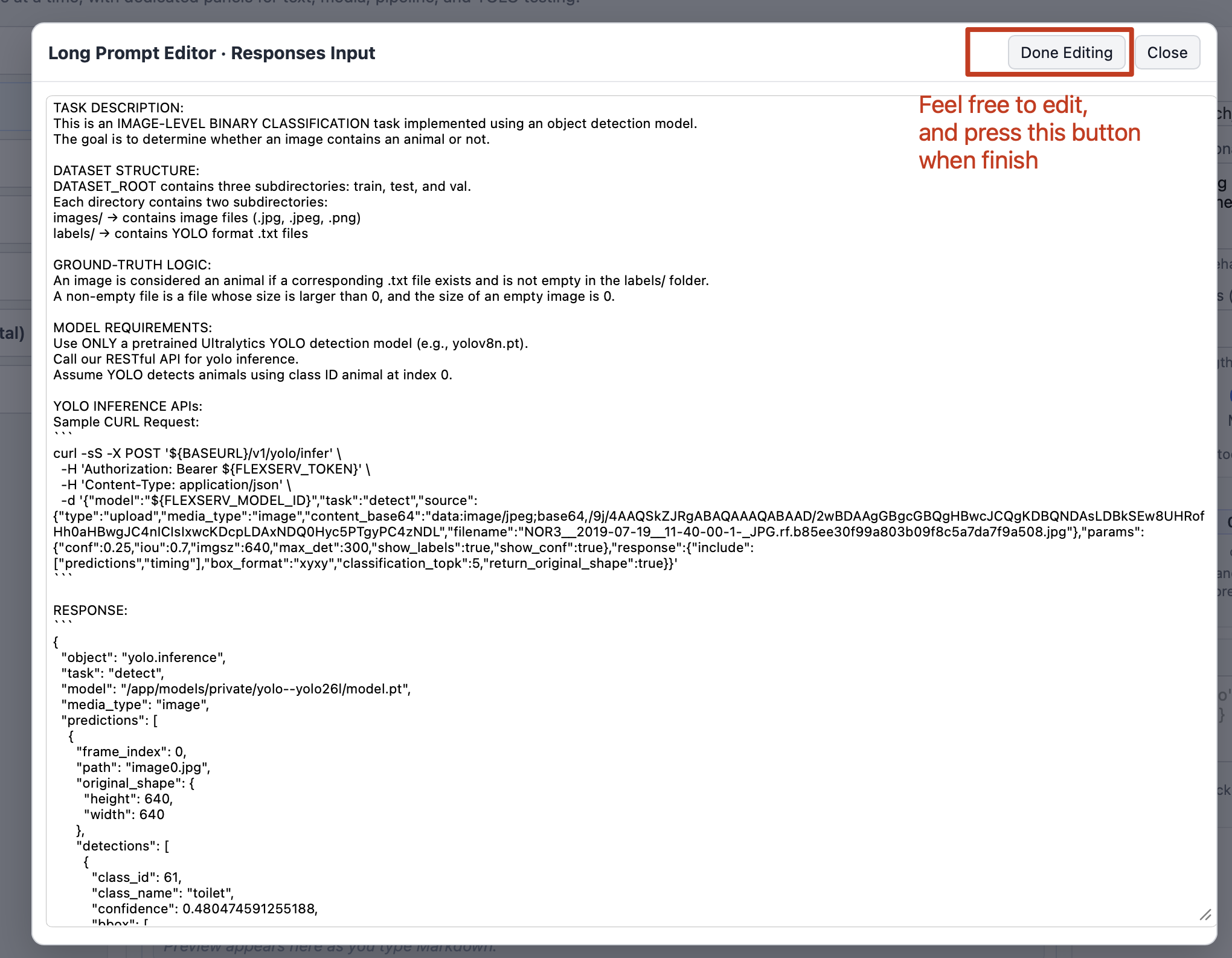
If you paste a prompt that is larger than 500 bytes, we will show that as a large text attachment below the text box. You can click on the text box to view and edit the large text.
Run the Responses API
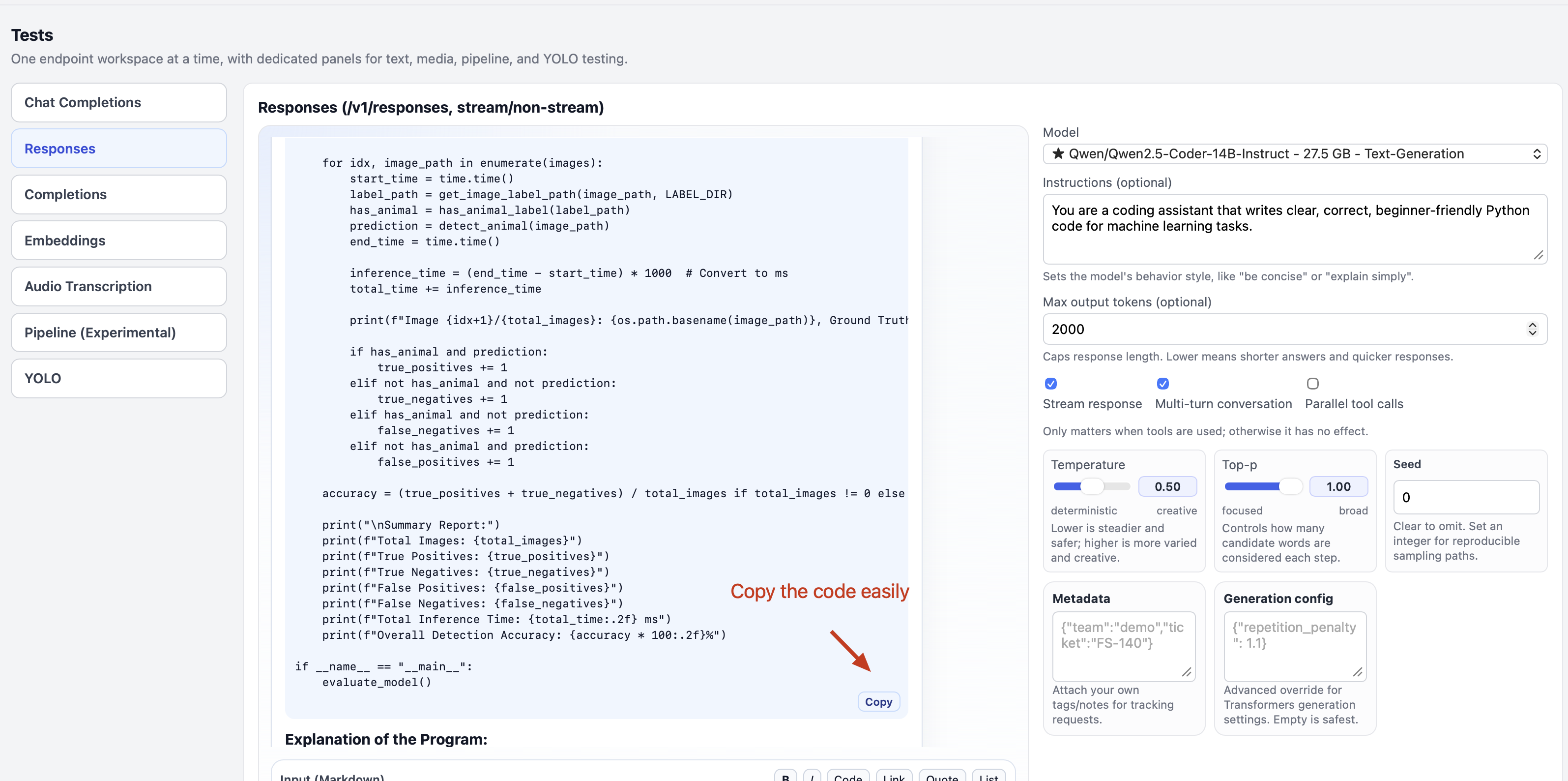
- After sending the prompt, you should see the code generation start in the blue box in the Responses API. Wait for it to complete. After completion, you should see output similar to the image below. Press the copy button to easily copy the code.
Running Code Detection On Jupyter
Go to the Jupyter notebook Code-Detection on your Jupyter path.
ai-tutorial-2026 -> notebooks -> Code-Detection.ipynb
Copy the generated code from FlexServ UI in a new cell below the cell titled Put your generated code here.
Make sure the variable DATASET_ROOT is set to path /home/jovyan/ai-tutorial-2026/datasets/AnimalEcology.v4i.yolov11 in your generated code.
Make sure the variable BASEURL is set to the Base URL of your FlexServ and FLEXSERV_TOKEN is set to your FlexServ token.

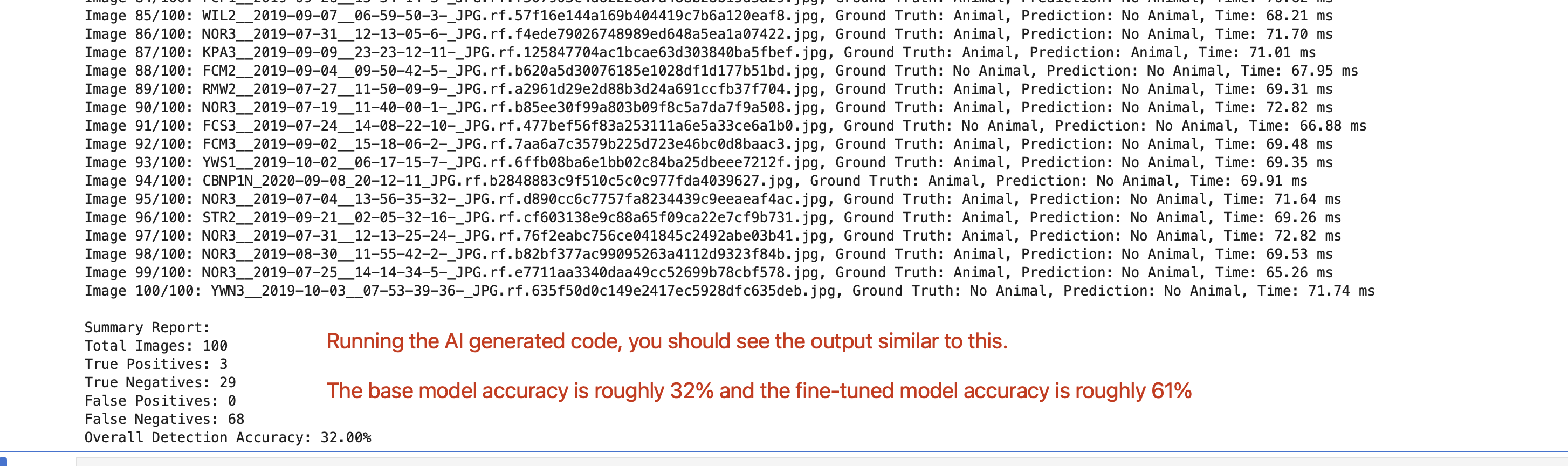
Running the code in Jupyter, and you should be able to see the evaluation result similar to below